Ratings & CSAT
Two separate quality signals — thumbs on each answer, and a 1–5 CSAT score for the whole conversation
Clanker Support gives visitors two ways to tell you how it's going, and deliberately keeps them apart: a thumbs up/down on each individual answer the agent gives, and a separate 1–5 CSAT rating for the whole conversation. One measures answer quality, the other measures the overall experience — and neither is ever folded into the other.
Per-message thumbs: answer quality
Every answer the agent streams into the widget carries small thumbs up/down controls. Visitors rate individual answers as they read them — no form, no interruption. They can change their mind: tapping the other thumb switches the rating, and tapping the same one again clears it.
A few properties of this signal:
- It's per answer, not per conversation. A visitor can mark one reply helpful and the next one not — which is exactly the granularity you want when deciding which answers to fix.
- Only the agent's answers are rateable. Visitor messages and teammate replies don't take thumbs.
- It's actionable at the knowledge level. A downvoted answer usually points at a gap or a stale entry in your knowledge sources; an upvoted one is worth capturing as a Q&A pair in your sources.
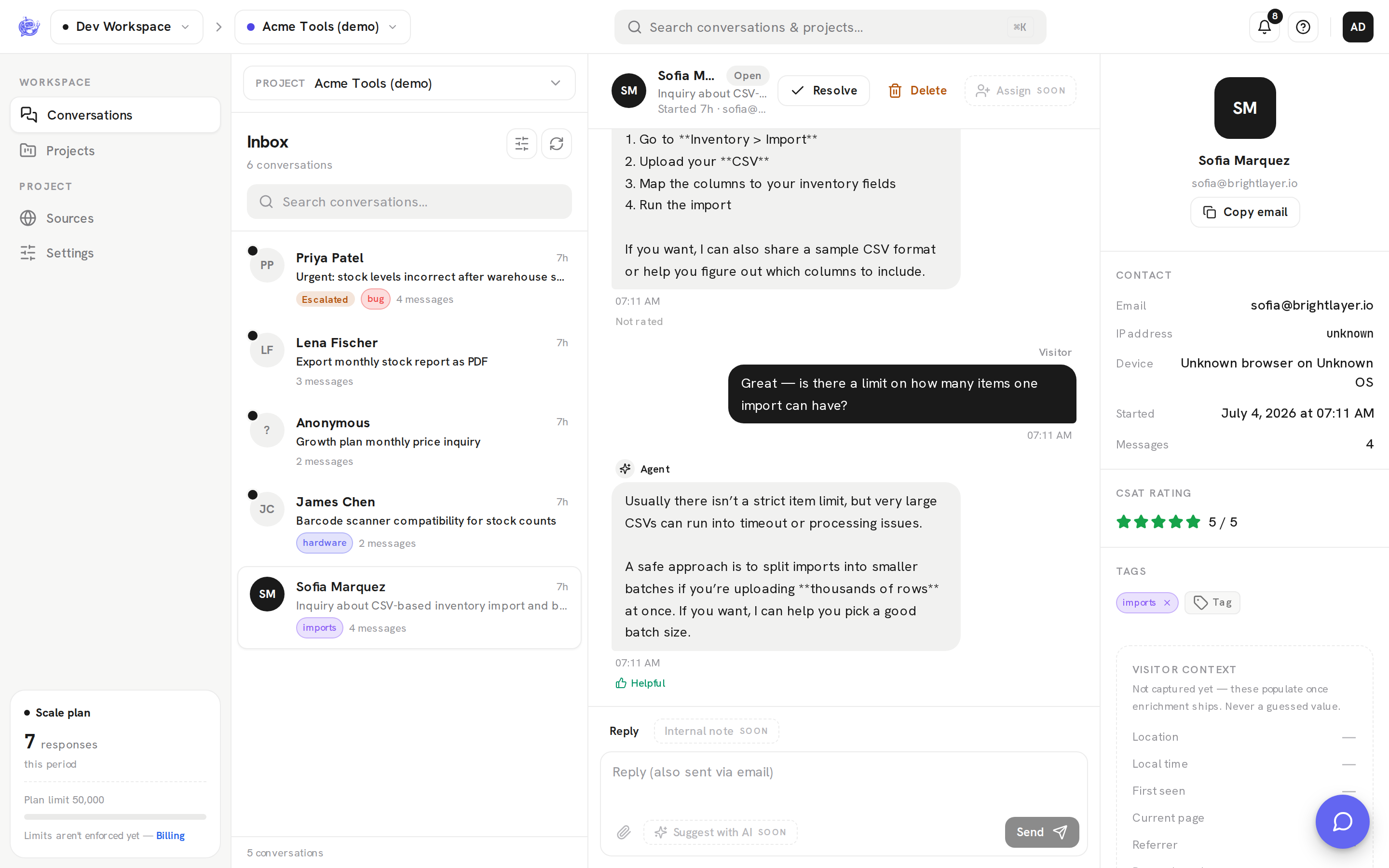
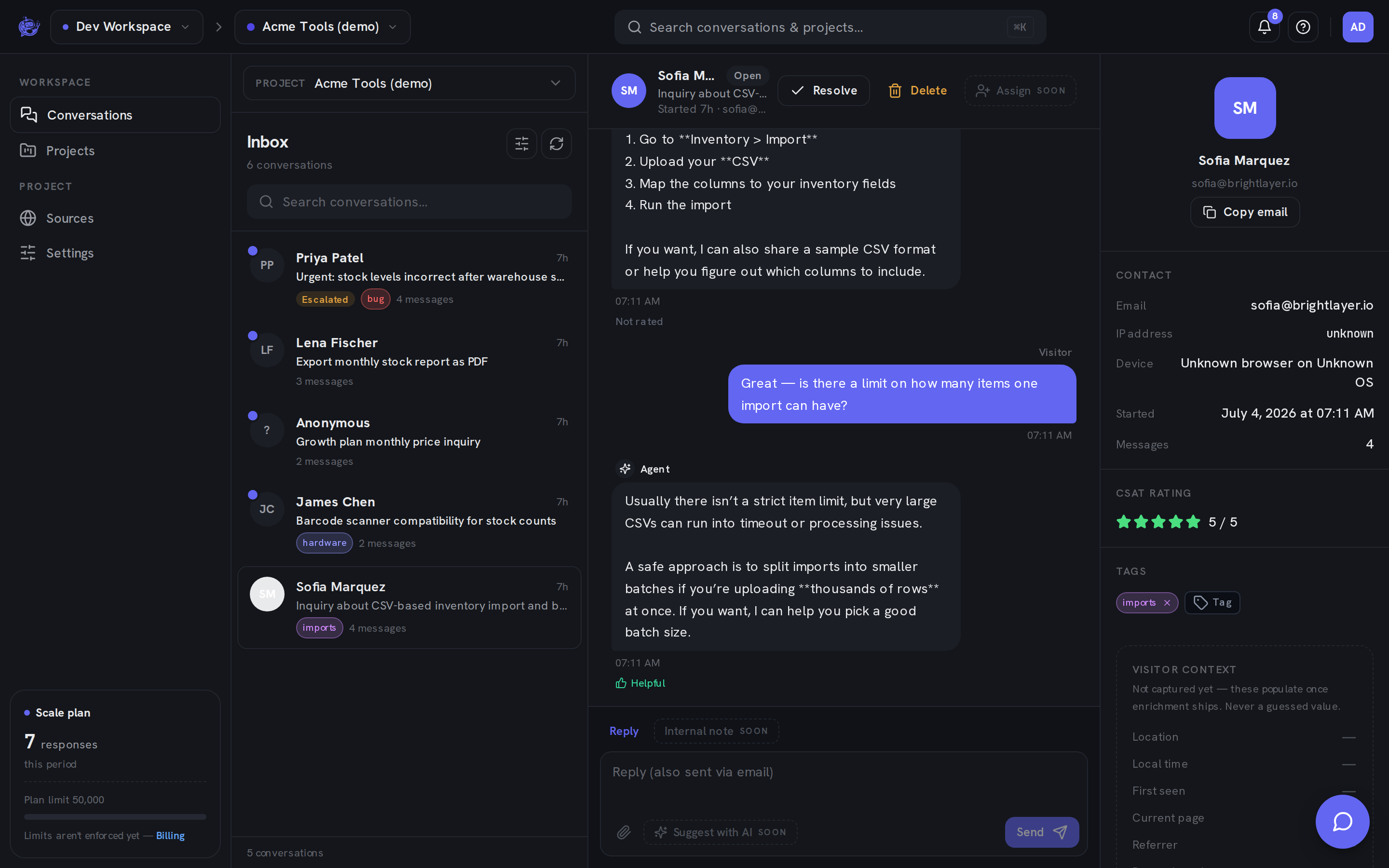
In the dashboard, thumbs show up inside the conversation thread: each agent reply displays Helpful, Not helpful, or "Not rated" beneath its bubble. The rating is read-only for your team — it's the visitor's verdict, not something operators edit.
Conversation CSAT: experience quality
When a visitor closes the chat, the widget asks them to rate the conversation from 1 to 5. This is a single score for the whole exchange — did they get what they came for? — and it's stored on the conversation, not on any message.
A visitor can only rate their own conversation, and the widget only asks once — a rated conversation is never re-prompted. CSAT applies to the conversation regardless of who handled it: a thread the agent resolved alone and a thread your team took over after escalation are both eligible.
Where each shows up in the dashboard
| Signal | Where you see it | | --------------- | ----------------------------------------------------------------------------------------------------- | | Thumbs | In the thread view, under each agent answer — Helpful, Not helpful, or "Not rated" | | CSAT | In the conversation's details panel, as 1–5 stars (or "Not rated") | | CSAT, aggregate | The inbox stats cards show Avg rating — the average CSAT across rated conversations, project-wide |
The inbox average counts only conversation-level CSAT scores. Thumbs are never averaged into it.
Why they're kept separate
Merging the two would destroy both signals. A visitor can rate three answers "not helpful" and still leave a 5-star CSAT because a teammate stepped in and fixed everything — that tells you the handoff works but the knowledge base has a gap. The reverse happens too: every answer was technically correct, but the visitor left a low CSAT because the experience was slow or frustrating.
So use them for what they each measure:
- Thumbs → tune the agent. Chase down the downvoted answers, fix or add sources, refine your instructions.
- CSAT → track the outcome. Watch the inbox average as the health metric for the whole support experience.
Learn more
- Conversations — reading thumbs in a thread and the CSAT stars in the details panel.
- Inbox — the stats cards, including the project-wide average rating.